Periodic Table Elements Lookup App
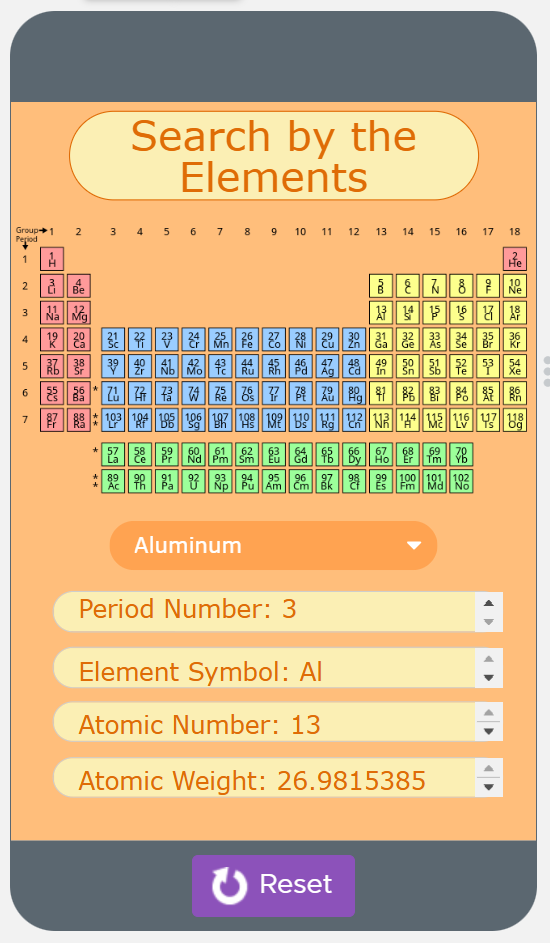
In 2022, my first computer science final project was a mobile app for Advanced Placement Computer Science Principles. Instruction and assignments for the class were on the platform Code.org, and this final project was also created on it. While “block coding” was an option, it was not used for this project. I and my pair coding partner created the concept and wrote the code for this app, using a dataset provided by Code.org.
The app can be accessed on Code.org here.
Original code for the app:
//Originally created: February 16 2022, updated April 20 2022

//The Purpose of the App:
//The purpose of this app is to make it more convenient and efficient to find information on
// certain elements the user is looking for
//(ie - period number, atomic number, symbol, and atomic weight)

//The lists below contain information from the data set,
//"Periodic Table elements," containing the information stated above on line 7

var elementNames = getColumn("Periodic Table Elements", "Name");
var periodNumbers = getColumn("Periodic Table Elements", "Period Number");
var elementSymbols = getColumn("Periodic Table Elements", "Symbol");
var atomicNumbers = getColumn("Periodic Table Elements", "Atomic Number");
var atomicWeights = getColumn("Periodic Table Elements", "Atomic Weight");

//The variables below contain the string/number that will be returned within each function
//except for updateScreen. It will hold the information of the selected element.

var chosenPeriodNumber = 0;
var chosenElementSymbol = "";
var chosenAtomicNumber = 0;
var chosenAtomicWeight = 0;

//Below is a function called "periodNumber." It contains a
//for loop that will go through the periodic table data set of all of the
//element names. It will then use an if statement to find the element that
//the user selects. Once it finds the element, it will use the index number
//or i to return that element's period number using the period number list

function periodNumber(dropDown) {
  for (var i = 0; i < elementNames.length; i++) {
    var selectedName = elementNames[i];
    if (dropDown == selectedName) {
      chosenPeriodNumber = periodNumbers[i];
    }
  }
  return chosenPeriodNumber;
}

//Every function except for "updateScreen" should be a similar
//concept and formating as the "periodNumber" function

function symbol(dropDown) {
  for (var i = 0; i < elementNames.length; i++) {
    var selectedName = elementNames[i];
    if (dropDown == selectedName) {
      chosenElementSymbol = elementSymbols[i];
    }
  }
  return chosenElementSymbol;
}

function atomicNumber(dropDown) {
  for (var i = 0; i < elementNames.length; i++) {
    var selectedName = elementNames[i];
    if (dropDown == selectedName) {
      chosenAtomicNumber = atomicNumbers[i];
    }
  }
  return chosenAtomicNumber;
}

function weight(dropDown) {
  for (var i = 0; i < elementNames.length; i++) {
    var selectedName = elementNames[i];
    if (dropDown == selectedName) {
      chosenAtomicWeight = atomicWeights[i];
    }
  }
  return chosenAtomicWeight;
}

//Test 1:
//Should return 20.1797
//console.log(weight("Neon"));

//Test 2:
//Should return 63.546
//console.log(weight("Copper"));

//The onEvent for the dropdown that allows the user to pick an element
//is below (line 91-96), the function updateScreen is called
//because this is when the screen needs to be updated
//depending on user input via the drop down

onEvent("elementDropDown", "change", function( ) {
  //chosenElementName variable holds the string in the dropdown
  //(ie - the element the user selects)
  var chosenElementName = getProperty("elementDropDown", "text");
  updateScreen(chosenElementName);
});

//the function updateScreen is below which is where
//the screen will update with the correct information about the element
//by calling the previously made functions

function updateScreen(name) {
  setProperty("periodNumberText", "text", "Period Number: " + periodNumber(name));
  setProperty("elementSymbolText", "text", "Element Symbol: " + symbol(name));
  setProperty("atomicNumberText", "text", "Atomic Number: " + atomicNumber(name));
  setProperty("atomicWeightText", "text", "Atomic Weight: " + weight(name));
}